Thursday, 17 October 2019

How to manually install the Securly SSL certificate in Chrome

How to manually install the Securly SSL certificate in Chrome

You would want to install the Securly SSL certificate in your Chrome browser to ensure the best browsing experience. The certificate does not control the level of filtering or what sites are allowed. The certificate will prevent errors on sites that Securly decrypts. Without the certificate, sites like Google.com and Facebook.com will show privacy errors, users will perceive this as the internet being “broken”. 

To install the Securly SSL certificate manually in Chrome, open ‘chrome://settings’ in your Chrome browser (version 59.0.3071 and above)
Installing on Chromebook (ChromeOS)
1. Download the Securly certificate.
     Chrome Expires 2020 Cert           
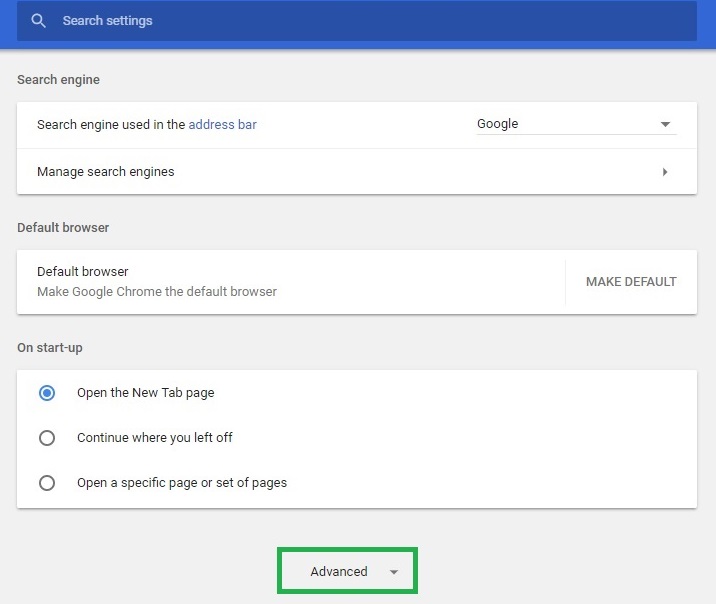
2. On the chrome://settings page scroll down to ‘Advanced’.
installsslcertichromebrowser3.jpg

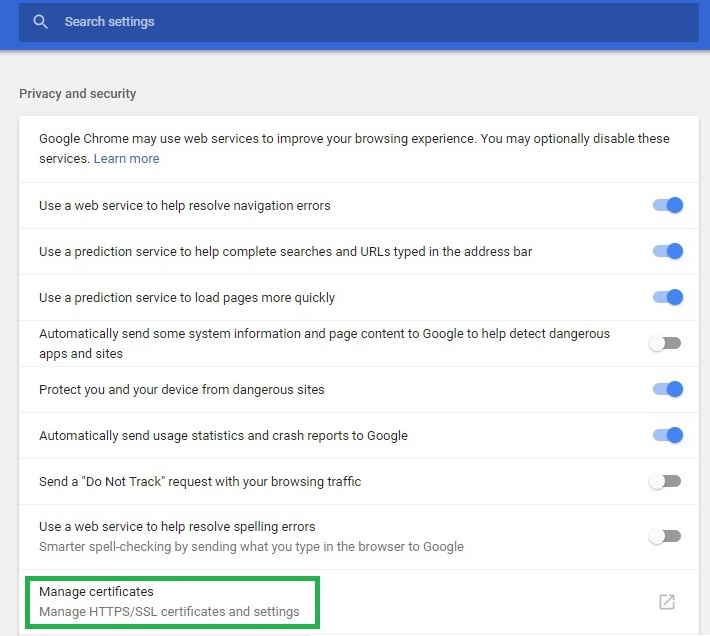
3. Under ‘Privacy and Security’ click ‘Manage Certificates’.
installsslcertichromebrowser2.jpg

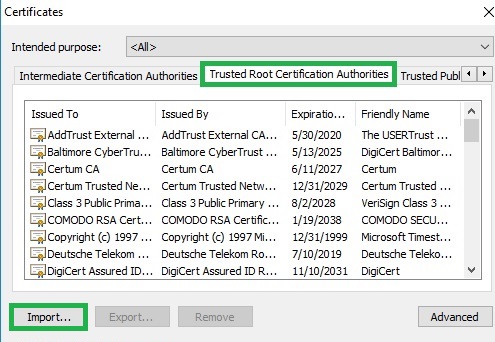
4. On the popup that is launched, select the ‘Trusted Root Certification Authorities’ tab and then click ‘Import’.
installsslcertichromebrowser1.jpg
5. A certificate import wizard is launched. Select the file downloaded in step 1 and finish the wizard.
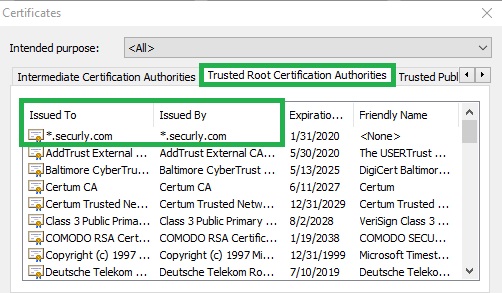
6. The installed certificate will be displayed under the ‘Trusted Root Certification Authorities’ tab.
installsslcertichromebrowser4.jpg
Installing in Chrome browser for Windows OS
It is recommended to install this to the Windows Operating system using the automated process by downloading the executable file attached at the end of this article. The Chrome browser will read from the Windows OS certificate store.
  1. On the ‘chrome://settings’ page complete steps 2-4 as in the section on ‘Installing on Chromebook’.
  2. A certificate import wizard is launched. Select the certificate file and finish the wizard.
  3. The installed certificate will be displayed under the ‘Trusted Root Certification Authorities’ tab.
Note: If you are using a Chrome browser version below 59.0.3071 you might experience some differences in navigation. This is because Google made changes to its Settings page in this version. In such cases you would need to navigate to ‘Show Advanced Settings > HTTPS/SSL > Manage Certificates’ and click Import under the ‘Authorities’ tab to import the SSL certificate.

Thursday, 4 July 2019

How to remove Escape sequence from String?

How to remove Escape sequence from String?

There are many ways to remove escape sequence from bulky string, specially I like to use RegEx from java side.

public class Test {
public static void main(String[] args) {
String s = "\n\n\tabcdtest";
String result = new Test().removeEscapeChars(s);
System.out.println("RESULT::"+result);
}
private String removeEscapeChars(String finalString) {
        Matcher matcher = Pattern.compile("\\&([^;]{6})", Pattern.CASE_INSENSITIVE).matcher(finalString);
        while (matcher.find()) {
            String before = finalString.substring(0, matcher.start());
            String after = finalString.substring(matcher.start() + 1);
            finalString = (before + after);
        }
        return finalString;
    }
}


Wednesday, 28 November 2018

Introduction to Ajax

Ajax is not a programming language. It is combination of java script and xml, so we can say say that ajax = java Script+xml. In another word,Ajax means, Asynchronous java script and xml, and this is  made popular in 2005 by Google suggest [Google search, while we are typing some thing in Google search box it will show you some suggestions automatically right that is Ajax]

What we can do with AJAX

With the help of AJAX we can move the data from one page to another page. We can also use for update the specific content without reloading or refreshing whole page. Now a days ajax is widely used in real time project. As I told you google search engine is used ajax to display suggestion..like this 😇😇😇..

Note*:- Before proceeding in ajax, you should have some basic knowledge about java script and CSS.  

OK friends!!! Before dive into the ajax, I want to discus here two terminology that are- 1.Synchronous and 2. Asynchronous.

What is Synchronous & Asynchronous

Synchronous :- Synchronous means at a time we can send single request and we need to wait for the response before send the second request.
Asynchronous:- In asynchronous we can send the multiple requests at a time without waiting response results.
Ajax works on Asynchronous concept.

Tuesday, 20 November 2018

Why doesn't a hash table allow null key and value, and why does Hash Map allow one null key and values?

Hello dude !  today we will talk about why HashTable doesn't allow key-value as a null while HashMap does??.........so lets go without wasting the time 😇😇😇.
We will discuss here this whole content into two parts. First we talk about HashTable then will come over HashMap.
So lets down with HashTable 😇😇😇😇😇.......

HashTable -  java.util.Hashtable

Hashtable is a class which came with the first version of java. When it was released Java engineers tried to discourage the use of null keys or maybe did not realize its usefulness. So, they did not allow it in the Hashtable. Here is internal code of put method....


In the above code you can see that, sun people didn't allow 'null' value as a key and value. If you supply value as a null, it will throw NullPointerException as you can see in source code. If you supply key as a null, it will also  throw NullPointerException due to 'int hash = key.hashCode()'  line because key is null so you can't invoke any method on null reference.

HashMap -  java.util.HashMap

In case of HashMap, it allows null keys and values but you can pass key as null only once while value can pass multiple times. Now I will show you here what happens when you pass null as a key. For null key , the value of hashCode will be 0. Here is internal implementation of HashMap

 
As you can see here, put(K key,V value) method is overridden by HashMap class which is coming from Map interface. So if you want to see the real implementation of put method ,need to go inside implementation of hash(key) because this guy is responsible for generating hashCode for supplied key.. 😆😆😆😆😆😆😆..so...lets come...


As you can see here, supplied key is null, it return 0 as hashCode else go for actual hashCode.

Sunday, 18 November 2018

Use of WHERE Clause

In relational database system,WHERE clause is used to filter the records or data. In other way you can say that, WHERE clause fetch those records only which full fill the specific condition.

WHERE clause Syntax

SELECT column1, column2, ...
FROM table_name
WHERE condition;
Here
  • SELECT column1 , column2, ... : is standard SELECT statement which is used to select the required number of columns. It may be up to N number of columns depends on number of table's columns.
  • FROM table_name  : This is used for selecting the required table from where you want to fetch the records. It may be more then one table in number..like SELECT table1 , table2 , table2 ....
  • WHERE conditions : Used here for filtering the records. As per applied condition, records shall be fetched.  
Note*:-WHERE clause is used in SELECT statements, apart from this you can also used it in UPDATE DELETE statements also.

Now theory is enough, lets go with practical examples 😌
Note*:- For all examples we will use MySQL database and MySql workbench as an editor client.
Assumed that ,  have a student table with following fields.


and I have already fed the data in this table.

Use cases

Case 1: Simple WHERE condition in queries : - If you want to fetch the record of students whose id is 103, then we can do this like.
SELECT *FROM student WHERE sid =103;

here '*' selects all columns of the table student. We can also write the same query like this

SELECT sid,sname,smobile,saddress FROM student WHERE sid =103;
Case 2: WHERE with logical AND : - If we apply more then one condition simultaneously and both must be satisfied , then we can go for logical AND. Lets say, if we want to fetch the record of students whose id is 103 and address must be 'South-x' then query goes like this...
SELECT *
FROM student
WHERE sid = 103 AND saddress = 'South-x';
Case 3: WHERE with logical OR : - If even single condition is true, result will produce in case of logical OR.
SELECT *
FROM student
WHERE sid = 101 OR saddress = 'South-x';

Note*:-In case of AND both conditions must be true but in OR conditions even one condition is true,it will produce result.


Case 4: WHERE with IN(...) : - If we want to supply multiple values in WHERE clause then we can use IN() operator. Lets see in the query....
SELECT *
FROM student
WHERE sid IN(101,102,103);

Case 5: WHERE with NOT IN(...) : - If we want to exclude multiple values from fetched records, then we can use NOT IN() operator. Lets see in the query....
SELECT *
FROM student
WHERE sid NOT IN(101,102,103);

Case 6: WHERE with COMPARISON OPERATOR: - WHERE is also used with comparison operators

  • =   Equal to :- Record fetched if exact match. 
  • >   Greater than :-All records fetched greater then supplied value.
  • <   Less than :- All records fetched less then supplied value.
  • <> Not Equal to :- All records fetched except supplied value.
SELECT * FROM student WHERE sid = 100;
SELECT * FROM student WHERE sid > 100;
SELECT * FROM student WHERE sid < 105
SELECT * FROM student WHERE sid <> 100;
Case 7: WHERE with DELETE: - WHERE is also used for deleting the specific records. Here we are going to delete the record of student whose id is 100.

DELETE 
FROM student
WHERE sid = 100;

Case 8: WHERE with UPDATE : - WHERE is also used with updating the specific records. Here we are going to update the mobile number whose id is 103.

UPDATE student SET smobile = '9887876567'
WHERE sid = 103;
It will update mobile no of student whose id is 103.
Note*:-During updating or deleting the records  from the table, do it carefully, if we do it without WHERE clause, either wipe out or modified whole data.

Summary

  • The SQL WHERE clause is used to restrict the number of rows affected by a SELECT, UPDATE or DELETE query.
  • The WHERE clause can be used in conjunction with logical operators such as AND and OR, comparison operators such as ,= etc.
  • When used with the AND logical operator, all the criteria must be met.
  • When used with the OR logical operator, any of the criteria must be met.
  • The key word IN is used to select rows matching a list of values.

Saturday, 17 November 2018

How to install Google Chrome

For installing Google Chrome in your Ubuntu system, you have need to follow some following steps.

STEP 1 : Execute the following commands-
cd /tmp
wget https://dl.google.com/linux/direct/google-chrome-stable_current_amd64.deb
sudo dpkg -i google-chrome-stable_current_amd64.deb
The 32-bit version is no longer available. During execution of above commands if you get any errors, please follow step 2 else skip it.

STEP 2 : Execute in case of error getting.
sudo apt-get -f install

Cross check

You can check it by typing google-chrome on terminal or hit the super key and search Google or Chrome.


Friday, 26 October 2018

What is the best way to download YouTube videos for free?

Today, I will talk about How we can download any www.youtube.com video without paying any cost. So lets start....I think this is probably the easiest way to download any YouTube video without any software any paying cost.  You have to just follow some steps:

STEP 1 : Open www.youtube.com in Google Chrome OR any its up to you, which browser you are using.

STEP 2 : Open the video that you want to download from www.youtube.com.

STEP 3 : Go to url and type ss before y.

Example-
Original URL : https://www.youtube.com/watch?v=GNS9L57xsbA
Modified URL : https://www.ssyoutube.com/watch?v=GNS9L57xsbA
After doing that, press enter ↵, a website en.savefrom.net will be appear on your screen with saving options. 


STEP 4 : Select the extension of the video you want to download and click on download.

Thats it..... :) :):):) Enjoy with your video.

Note *: For reference, I am going to attach my youtube video here.